
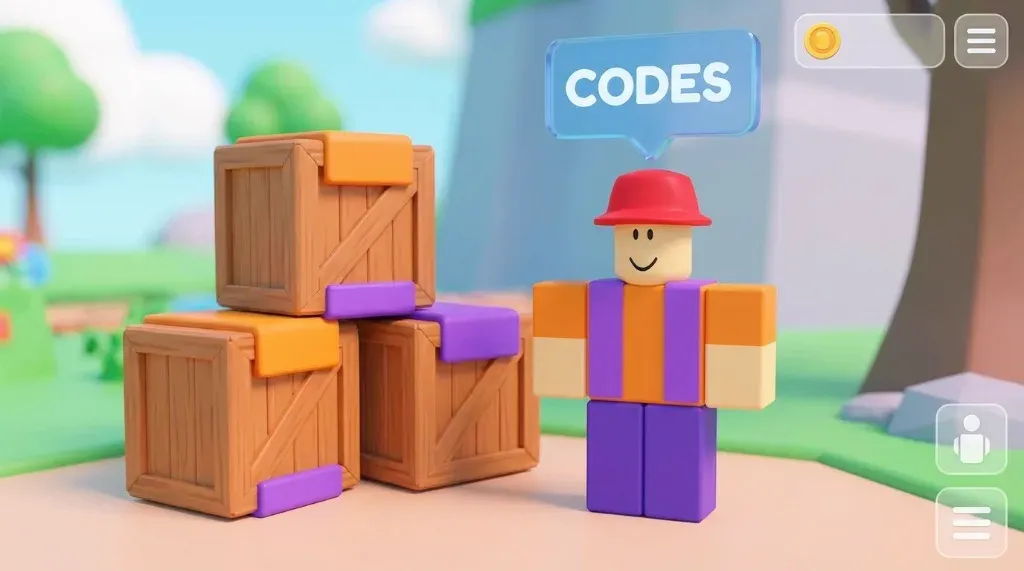
How to Redeem Codes in Solo Hunters 🎁
Can’t find where to enter your codes? The game doesn’t make it obvious!
📍 Where is the Code NPC?
To redeem codes, you must find the Red-Hat NPC. He is NOT in the menu.
- Spawn into the main lobby.
- Turn Left towards the Docks area.
- Look for a character wearing a Red Baseball Cap standing next to a stack of wooden crates.
- There is usually a blue “CODES” text floating above his head.
📝 Step-by-Step Redemption
- Walk up to the Red-Hat NPC.
- Click or Tap on him.
- A blue text box will appear on your screen.
- Copy & Paste a code from our Active Codes List.
- Press the green REDEEM button.
- Look at the bottom right of your screen for the reward notification!
⚠️ “Invalid Code” Errors?
If you get an error, check these common issues:
- Case Sensitive: “hunter” is WRONG. “HUNTER” is CORRECT.
- Extra Spaces: Make sure you didn’t copy a space at the end of the code.
- Already Used: You can only use each code once!
- Expired: The code might be old. Check our Expired Codes list.
See Also: